

Are you looking for Webmail? Go to Webmail
If you’ve ever heard us mention webmail and wondered what it is, you’re not alone! It’s one of the most common questions we receive.
What Is Webmail?
Webmail lets you access your business email through your internet browser – no Outlook or email app required.
Whether you’re using Chrome, Edge, Safari, or Firefox, you can log in to your mailbox from any internet-connected computer or mobile device.
Webmail is especially useful when:
- You’re using someone else’s computer.
- You’re travelling and don’t have access to your usual device.
- Outlook or your email app isn’t working.
- You need to quickly check or send an email without configuring an email application.
QUICK ANSWERS
Webmail Link:
https://webmail.konsoleh.co.za/
How do I access webmail?
Accessing your email through Webmail is quick and easy. All you need is an internet browser and your email login details.
Once you’ve logged in, you’ll be able to read emails, send new messages, reply to existing emails, and organise your inbox—just like you would in Outlook or another email application.
Step 1
Open your preferred web browser.
Open any modern web browser on your computer or mobile device, such as Google Chrome, Microsoft Edge, Mozilla Firefox and Safari (Mac & iPhone).
Step 2
Go to your Webmail login page
In the address bar at the top of your browser, enter:
https://webmail.konsoleh.co.za/ and press enter.
Step 3
Enter your login details
On the login screen, enter:
- Email Address: Your full email address (for example, john@yourbusiness.co.za)
- Password: The password for your email account
Tip: Make sure you enter your full email address, not just your name.
Click the Log In button to access your inbox.

Webmail FAQ
Are you looking for the Webmail link? Go to Webmail
I forgot my email password. What should I do?
If you have access to your control panel, you can reset your email password yourself:
- Log in to your Control Panel.
- Navigate to Mail Tools.
- Select Mail Admin.
- Choose the email account and reset the password.
If you don’t have access to the Control Panel, don’t worry. Simply contact the Blue Digital team, and we’ll reset your password for you.
Why should I check Webmail first if Outlook or my email app is giving errors?
Checking Webmail is one of the quickest ways to determine where the problem lies.
- If Webmail works, your email account is working correctly, and the issue is likely with Outlook or the email app on your device.
- If Webmail doesn’t work, there may be an issue with your email account, password, or the mail server.
Checking Webmail first helps us diagnose the problem much faster and ensures we’re looking in the right place.
What should I do if Webmail isn't loading?
If you’re unable to access Webmail or log in successfully, try the following:
- Make sure you’re using the correct Webmail address.
- Double-check that you’re entering your full email address and the correct email password.
- Ensure your internet connection is working.
- Try opening Webmail in a different browser, such as Chrome, Edge, Firefox, or Safari.
- Clear your browser’s cache or try using an Incognito/Private browsing window.
If you’re still unable to access Webmail after trying the above, contact the Blue Digital team and we’ll help investigate the issue.
Can I use Webmail to send and receive emails?
Yes. Webmail gives you full access to your mailbox. You can:
- Send and receive emails.
- Reply and forward messages.
- Organise emails into folders.
- Search your mailbox.
For most users, Webmail provides all the essential features needed to manage email from any device with an internet connection.
Can I set up an email forwarder or auto-responder from Webmail?
Yes. You can configure both email forwarders and automatic replies (auto-responders) directly from Webmail.
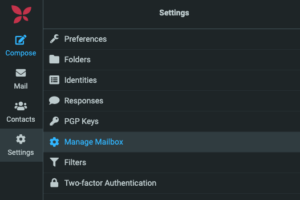
After logging in, navigate to Manage Mailbox Settings, where you’ll find options to:
- Set up an email forwarder.
- Create or edit an automatic reply (out of office).
- Manage other mailbox settings.
If you’re unsure where to find these options or need assistance setting them up, the Blue Digitals team is always happy to help.
If you experience any difficulties accessing your email account or configuring your mail client, the Blue Digital team is available to assist with email setup and troubleshooting.